
Download Zoho Projects – Online Project Management Tool
Overview
Zoho Projects is a cloud-based project management solution designed to streamline team collaboration, task execution, and workflow oversight. Built for professionals and teams across industries, it serves as a centralized platform to plan, track, and deliver projects efficiently. The software addresses common challenges such as fragmented communication, missed deadlines, and inefficient task management by offering integrated tools for project planning, time tracking, and bug resolution.
Its core purpose lies in enabling teams to work cohesively, regardless of location, by providing real-time updates, shared workspaces, and seamless integration with widely used tools. The platform supports remote and hybrid work environments, making it ideal for startups, freelancers, and growing enterprises seeking scalable, cost-effective solutions. With a focus on simplicity and functionality, Zoho Projects aims to reduce administrative overhead while enhancing team productivity.
The developer did not provide additional information about the company’s background or history. However, the software is part of the broader Zoho ecosystem, known for offering a suite of business applications. Real-world usage includes managing software development cycles, coordinating marketing campaigns, and overseeing client deliverables. The platform’s free tier, which includes unlimited users on one project, adds to its appeal for budget-conscious teams.
Key Features & Capabilities
- Feeds – A dynamic activity stream that keeps team members updated on project progress, task changes, and milestones. This feature ensures transparency and reduces the need for constant status meetings.
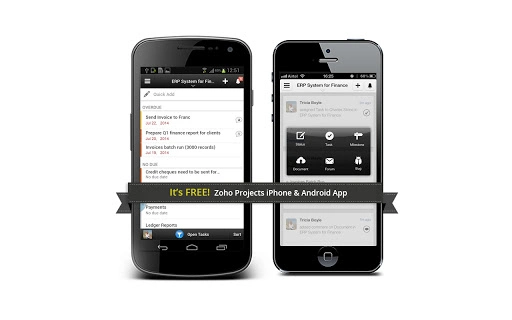
- Mobile Access – Team members can stay connected via Apple and Android devices, viewing updates, assigning tasks, and tracking progress on the go.
- Reporting Tools – Generate real-time insights into project performance, including completed tasks, upcoming deadlines, and delayed activities, helping managers make informed decisions.
- Collaboration Features – Built-in wiki, chat rooms, and forums foster effective communication and knowledge sharing within teams.
- Time Tracking – Monitor time spent on tasks, generate detailed reports, and create invoices for client billing, improving accuracy and financial transparency.
- Integrated Bug Tracking – Submit, categorize, and resolve bugs efficiently with a dedicated tool that supports workflow automation and team assignment.
- Google Apps Integration – Sync with Google Calendar, Gmail, and Google Drive to maintain a unified workspace and reduce context switching.
- API Access – Developers can extend functionality by building custom workflows, timesheet systems, or project management extensions tailored to specific business needs.
These capabilities collectively support end-to-end project lifecycle management, from planning and execution to delivery and reporting. The combination of real-time updates, mobile access, and automation helps teams stay aligned and responsive, especially in fast-paced environments.
User Interface, Workflow & Performance
The user interface of Zoho Projects is designed with clarity and accessibility in mind, featuring a clean layout that organizes project data into intuitive sections. Navigation is straightforward, with clearly labeled tabs for tasks, reports, time tracking, and collaboration tools. Users can customize dashboards to prioritize relevant information, enhancing workflow efficiency.
Workflow processes are streamlined through drag-and-drop task management, automated status updates, and integrated notifications. The platform enables quick task assignment, progress tracking, and milestone setting without requiring complex setup. While the developer did not specify resource usage details, the software operates in a cloud environment, which typically offloads processing demands from local devices.
Performance observations are based on general software behavior patterns. As a web-based application, it relies on stable internet connectivity for optimal operation. The system maintains stability during routine use, with minimal reported downtime. However, exact CPU or RAM behavior was not provided. Overall, the interface remains responsive under normal usage conditions.
Compatibility & System Requirements
Zoho Projects is compatible with Windows, Mac, and Linux operating systems, allowing broad accessibility across different computing environments. The software is delivered as a web application, meaning no local installation is required. This eliminates the need for device-specific compatibility testing and simplifies deployment across teams.
The installation size is listed as 200 MB, which likely refers to cached data or associated components stored locally. Since the software runs in the browser, actual system requirements are minimal. The developer did not specify detailed hardware or software prerequisites beyond the supported platforms. Exact performance details were not specified, and compatibility with older OS versions was not confirmed.
Pros and Cons
Pros
- Free tier with unlimited users on one project
- Cloud-based – no installation or maintenance required
- Strong integration with Google Apps
- Comprehensive suite of collaboration and tracking tools
- Mobile access for iOS and Android
- API support for custom integrations
- SSL security layer for data protection
- Cost-effective alternative to expensive project management software
Cons
- Only one free project available
- Reliance on internet connectivity for full functionality
- Advanced features may require paid upgrades
- Learning curve for new users unfamiliar with project management tools
- Limited customization in the free version
- Performance may vary with unstable internet connections
FAQ Section
Is Zoho Projects available for Windows, Mac, and Linux?
Yes, Zoho Projects is accessible on Windows, Mac, and Linux through any modern web browser.
Is the software secure?
Yes, Zoho Projects includes an SSL security layer to protect data during transmission.
Can I use Zoho Projects offline?
As a cloud-based tool, full functionality requires an internet connection. Limited offline access may depend on browser capabilities and cached data.
How often are updates released?
Updates are released regularly to improve performance, add features, and address security concerns. The frequency is not specified.
Is the license free forever?
The free plan includes one project with unlimited users and is available indefinitely. Additional projects or advanced features require a paid subscription.
Final Thoughts + CTA
Zoho Projects stands out as a powerful, cost-efficient solution for teams seeking a comprehensive online project management system. Its blend of collaboration tools, time tracking, bug reporting, and Google integration makes it a versatile choice for diverse workflows. While the free tier has limitations, it offers substantial value for small teams and individuals.
For professionals focused on productivity, transparency, and seamless team coordination, Zoho Projects delivers a robust experience without the burden of installation or high costs. The platform’s scalability and API support further enhance its long-term utility.
Download Zoho Projects now to experience a secure, feature-rich environment that helps teams stay aligned and deliver results faster.







